Air Purifiers for Home Offices
In a 6 to 10 hour workday, air purifiers for home offices work best when they fit the room, stay quiet at the setting you will actually use, and leave…
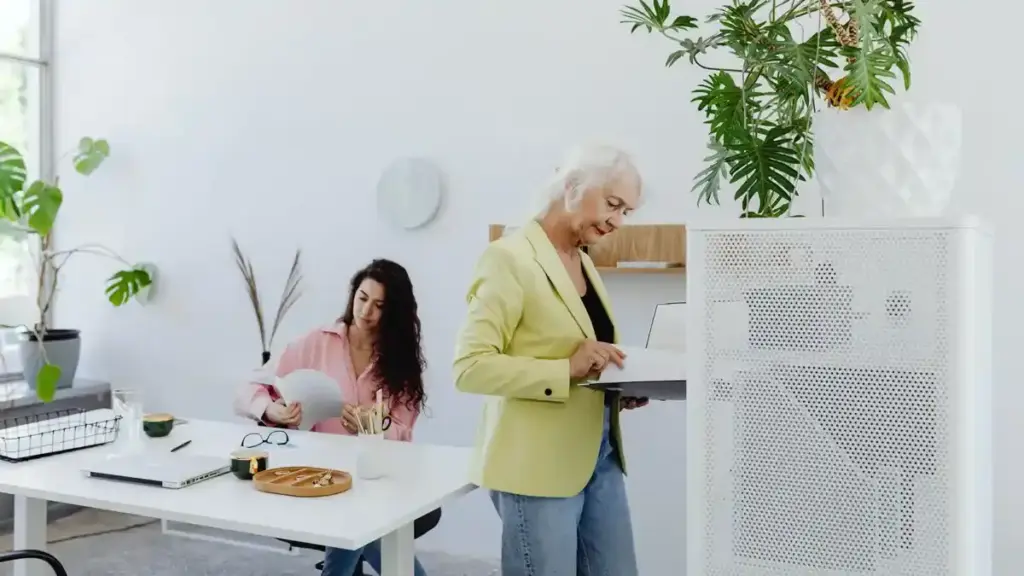
People in an office beside a large white air purifier
Last updated: November 26, 2026
Quick Answer: In a 6 to 10 hour workday, air purifiers for home offices work best when they fit the room, stay quiet at the setting you will actually use, and leave airflow open around the desk. This guide to Air Purifiers for Home Offices: Clean Air Without Disrupting Work focuses on that setup, not on gadget features that do not help during calls or deep work.
An air purifier for a home office can clean the air without stealing attention, but only if it fits the room, sits where airflow can reach the desk, and stays quiet enough for calls and focus. The right setup for Air Purifiers for Home Offices: Clean Air Without Disrupting Work solves dust, odors, and lingering indoor particles without turning your workday into a fan test.
Key takeaways
- A home office purifier should fit the room and the work, not just the square footage.
- Noise matters as much as filtration in a space used for calls, writing, or deep focus.
- Airflow around the desk matters because a blocked intake or outlet wastes the machine’s effort.
- A smaller room usually needs a simpler setup than an open-plan office corner.
- The goal is cleaner air during the workday, not a loud machine running at full speed all day.
What does a home office air purifier actually do?
A home office air purifier removes airborne particles from the air around your desk and work area, which can make a small room feel less stale and less distracting. In a room where you sit for 6 to 10 hours, that matters more than in a space you only use briefly.
The useful part is not mystery-clean air. It is practical cleanup: dust, smoke particles, and other fine stuff that floats long enough to be inhaled or noticed. The Environmental Protection Agency’s indoor air guidance is a good starting point for the general idea that indoor air can be affected by many sources, and that portable air cleaners can help in some spaces.
Because a home office is a special case, the purifier has to do two jobs at once. It has to move enough air to matter, and it has to stay quiet enough that a video call at 2 p.m. does not sound like a box fan is under the desk. That trade-off means the “best” purifier on paper is not always the most practical choice for work.
For a reader who wants one plain answer: yes, an air purifier can help a home office feel cleaner and less distracting, but only if the airflow, placement, and noise level fit the room. If those three pieces are wrong, the machine can become background clutter instead of useful equipment.
For a broader look at room-by-room air quality problems, the hub page on air quality problems and what to do gives the bigger picture without turning this page into a general indoor air guide.
How do you choose the right one for a desk setup?
The right choice is the one that matches the room size, the sound you can tolerate, and the amount of airflow you need near the desk. That is the whole decision in one sentence.
Because of that, a generic shopping approach usually gets this wrong by treating all small rooms as equal; if the office layout is unusual, consult a professional and compare the room against guidance from the Association of Home Appliance Manufacturers and the EPA. A 10-by-10 office with one door behaves differently from a compact room filled with shelves, monitors, and a printer. A purifier that feels fine in a bedroom may still sound too noticeable in a silent writing space.
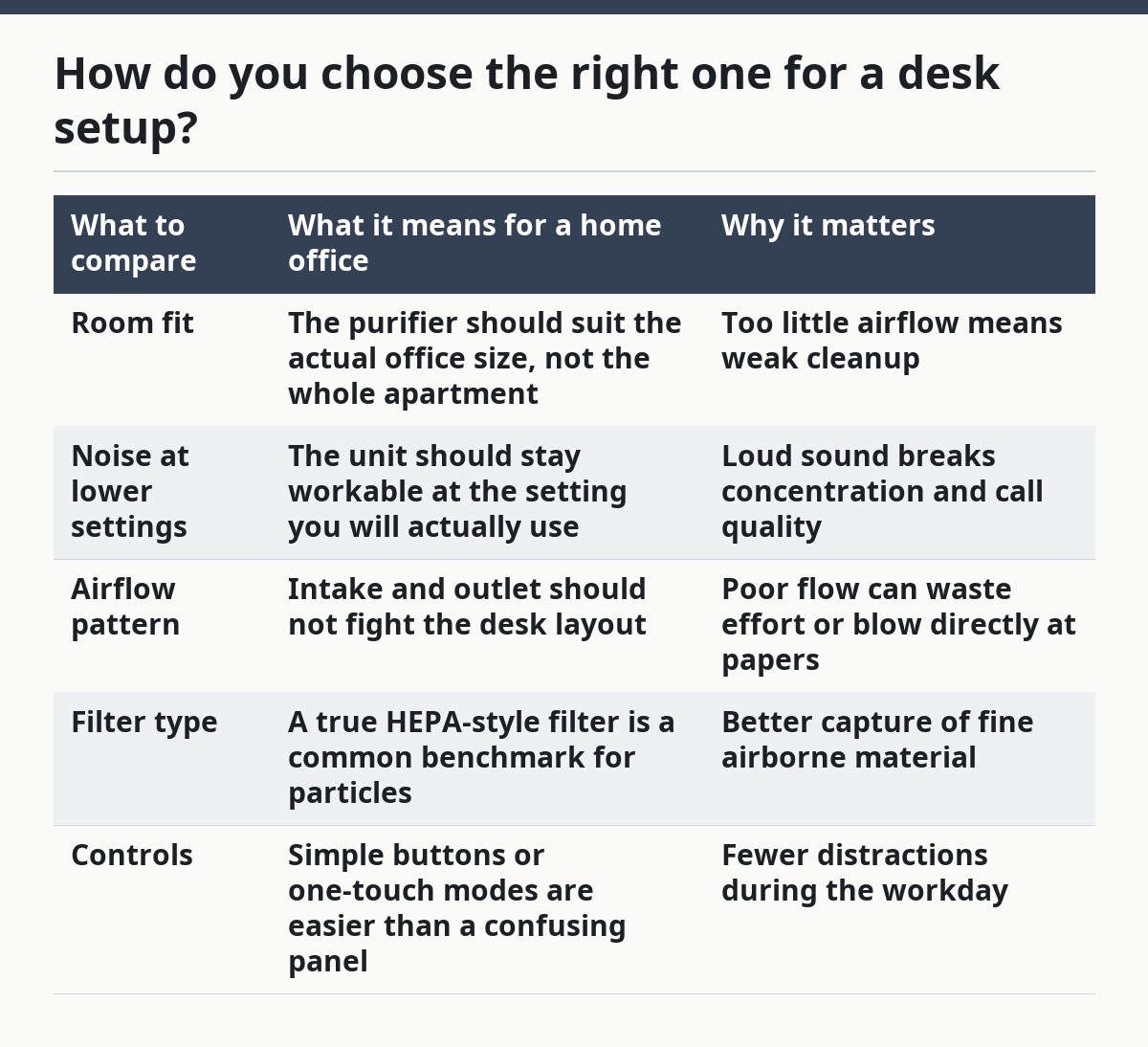
Use this simple filter when comparing models:
| What to compare | What it means for a home office | Why it matters |
|---|---|---|
| Room fit | The purifier should suit the actual office size, not the whole apartment | Too little airflow means weak cleanup |
| Noise at lower settings | The unit should stay workable at the setting you will actually use | Loud sound breaks concentration and call quality |
| Airflow pattern | Intake and outlet should not fight the desk layout | Poor flow can waste effort or blow directly at papers |
| Filter type | A true HEPA-style filter is a common benchmark for particles | Better capture of fine airborne material |
| Controls | Simple buttons or one-touch modes are easier than a confusing panel | Fewer distractions during the workday |
The AHAM CADR standard, or Clean Air Delivery Rate, is a useful way to describe how much filtered air a purifier can deliver. That number matters because it gives you a comparison point instead of a vague promise. If you see CADR listed, you can compare models more directly than by fan size alone.
Higher airflow often means more sound. A purifier that runs hard can clean faster, but it may be the wrong choice for a room where you spend half the day on calls. For a home office, that makes lower-speed performance more important than raw top speed.
If the office is tiny, one compact unit is usually easier to live with than a larger machine that dominates the room. If the room is shared with another purpose, such as a guest space, choose a unit that disappears visually and acoustically when it is not in the way.
Where should i place an air purifier near a desk?
An air purifier near a desk should sit where air can move freely around it, while staying far enough from the chair and monitor to avoid a direct blast. That is the basic rule for a work setup.
The biggest mistake is pushing the unit into a corner, under a table, or behind a stack of boxes. That saves floor space but chokes the intake and outlet. The purifier then moves less air than the label suggests, and the room still feels dusty or stale.
A desk setup usually works best when the purifier has open space on at least one side and a clear path for airflow across the room. If the output points straight at your face, papers, or microphone, it can become annoying even if the machine is doing its job. In a work area, annoyance is a real cost.
Follow this basic setup process:
- Put the purifier on the floor or a stable surface beside the desk, not tucked behind it. The result should be clear air movement around the machine.
- Leave visible space around the intake and outlet, especially on the side that pulls in air. The unit should not feel boxed in by a cabinet or stack of folders.
- Start on a lower setting and listen for 10 to 15 minutes. If the sound fades into the room, that is a good sign for long work sessions.
- Move it a small distance at a time if the airflow feels too direct. A shift of even a little can change whether it feels helpful or distracting.
- Use the setting that keeps the room comfortable without becoming a constant presence. The goal is background support, not a machine you think about all afternoon.
A placement mistake usually costs two things at once: cleaning performance and focus. The fix is not to crank the machine harder. It is to give the unit better access to air and a less intrusive path near the desk.
This is also where room shape matters. A narrow office can bounce airflow differently than a square one. A room with an open door may also lose some of the purifier’s effect because the air does not stay still. In practice, that means the “right” spot is often the spot that feels boring: out of the way, open on one side, and easy to forget.
How much noise is too much for work?
An air purifier is too noisy for work when you notice it more than your task, your call, or your train of thought. That is the practical test for a home office, and it matters more than a marketing claim on the box.
Noise has a real work cost. A humming fan can be tolerable while reading email, then turn irritating during writing, editing, or video meetings. The wrong sound also makes a small office feel busier than it is, which is a problem when you need calm for an hour or two at a time.
The useful rule is to think in settings, not just in the machine’s loudest mode. Many purifiers have more than one speed, and the setting you use most often is what determines whether the unit feels acceptable. A powerful top setting is less important if you never want to use it during work hours.
A simple comparison helps:
| Setup choice | Best for | Trade-off |
|---|---|---|
| Low speed during work | Calls, writing, reading | Slower air movement |
| Higher speed before or after work | Quick cleanup after dust or odors | More noticeable sound |
| Continuous moderate setting | Offices used all day | Ongoing background noise |
| Short bursts only | Light use or occasional refresh | Less steady air cleaning |
The question is not “Can I hear it?” because some sound is normal. The question is whether the sound competes with the task. A purifier that blends into the room at a low setting can be useful every day. A purifier that demands attention will get switched off, which defeats the point.
This is one reason a home office purifier is different from a bedroom unit or a living-room unit. In an office, the machine has to support concentration during the exact hours you are trying to stay sharp.
Which features matter most during the workday?
The most useful features for a home office air purifier are simple controls, a trustworthy airflow rating, and a design that fits the room without stealing attention. Fancy extras matter less than those basics.
A timer can help if the purifier runs before the workday starts or after you leave the room. A filter indicator can help with planning, although it should not be the main reason to buy a unit. A display that is too bright can be a nuisance in a dim office, especially if your desk faces a screen.
Look for features that reduce friction, not ones that add novelty:
- Clear speed settings instead of a maze of modes.
- A compact footprint if the office is small.
- A filter system you can replace without moving the desk.
- A body shape that does not crowd a chair, printer, or filing shelf.
- An airflow rating that is described in a standard way, such as CADR.
The biggest mistake here is overbuying features you will not use. Ionizers, extra lighting, or app controls may sound useful, but a home office usually needs predictability more than gadgetry. If a feature makes the unit louder, brighter, or harder to adjust, it can work against concentration.
There is also a straightforward maintenance trade-off. A purifier only helps as long as the filter is kept in good shape. If changing the filter is awkward, the machine tends to drift into the background until performance drops. In a work setting, that means the office slowly becomes less comfortable without a clear warning.
A sensible office purifier is often boring in the best way. It starts easily, stays out of your way, and keeps doing the same job on ordinary Tuesday afternoons. That is worth more than a long list of features you never touch.
What mistakes cost focus the fastest?
A bad choice can cost focus quickly when the purifier fights the room instead of working with it. The result is a cleaner-sounding product with worse day-to-day use.
One common mistake is buying by room size alone and ignoring the desk layout. A machine may be rated for the room, yet still be awkward beside a desk, too loud at the needed setting, or hard to place without blocking airflow. The cost is a unit that does not get used.
Another mistake is running it on the loudest setting all day. That may feel efficient, but it can wear on concentration and make calls unpleasant. A quieter setting used consistently is often more workable than maximum speed used grudgingly.
A third mistake is placing it where it looks tidy but performs badly. Under-desk and corner placements save space, yet they often cut off airflow. The purifier then works harder for less result, and the room still feels dusty.
A fourth mistake is expecting one small unit to fix every air problem in a larger shared room. If the home office opens into another space, the purifier may help, but it may not create the same effect as it would in a closed room. That is not a failure of the machine; it is a mismatch between the setup and the room.
A home office purifier is worth it when the room is compact, the machine fits the desk layout, and the sound stays low enough to ignore. It is a weaker choice when the room is open, the desk is crowded, or the workday depends on silence that even a soft fan can disturb.
How should i use one during the workday?
A home office air purifier works best when it runs like part of the room, not like a special event. Start it before your workday, keep it on a setting you can ignore, and adjust only when the room changes.
If the office gets dusty by midafternoon, a brief higher-speed run before work or after the day ends can help. If the room is used only for a few focused hours, the lower setting may be enough. The point is steady support, not constant attention.
The EPA’s indoor air guidance and the AHAM CADR standard are useful anchors if you want to compare claims without getting lost in marketing language. One gives the health-minded context for indoor air, and the other gives a practical way to compare air-cleaning output. Those two ideas together are enough to make a sensible choice for a desk-based room.
For most home offices, a modest setup is usually enough: a purifier that fits the room, a placement that leaves air pathways open, and a low setting that does not compete with your work. That combination usually beats a louder, flashier machine that looks impressive but gets turned down or off.
Is an air purifier good for a home office?
Yes, an air purifier is a good fit for many home offices because it can reduce airborne particles without changing the room layout. It works best in a closed or mostly closed room where the desk, chair, and machine can be arranged with clear airflow. If the office is open to a larger area, the benefit is usually weaker.
Where should i place an air purifier near a desk?
Place it where air can move freely and where the sound will not land directly in your line of attention. A spot beside the desk with open space around the intake and outlet is usually more practical than a corner or under a table. The wrong placement can reduce both cleaning power and focus.
What features matter for an office air purifier?
The most useful features are simple controls, a sound level you can live with, and a clear airflow rating such as CADR. A compact body helps in smaller offices, and an easy filter change matters if the machine will run most days. Bright displays and extra modes matter less than steady, quiet use.
Drafted with AI; not yet reviewed by a person.