Air Purifier Filter Light Won’t Reset? Step-by-Step Fix
Air purifier filter light wont reset? Reseat the filter, hold the reset button the right number of seconds, check the panel latch, then power-cycle it.
Image: ErikaWittlieb via Pixabay
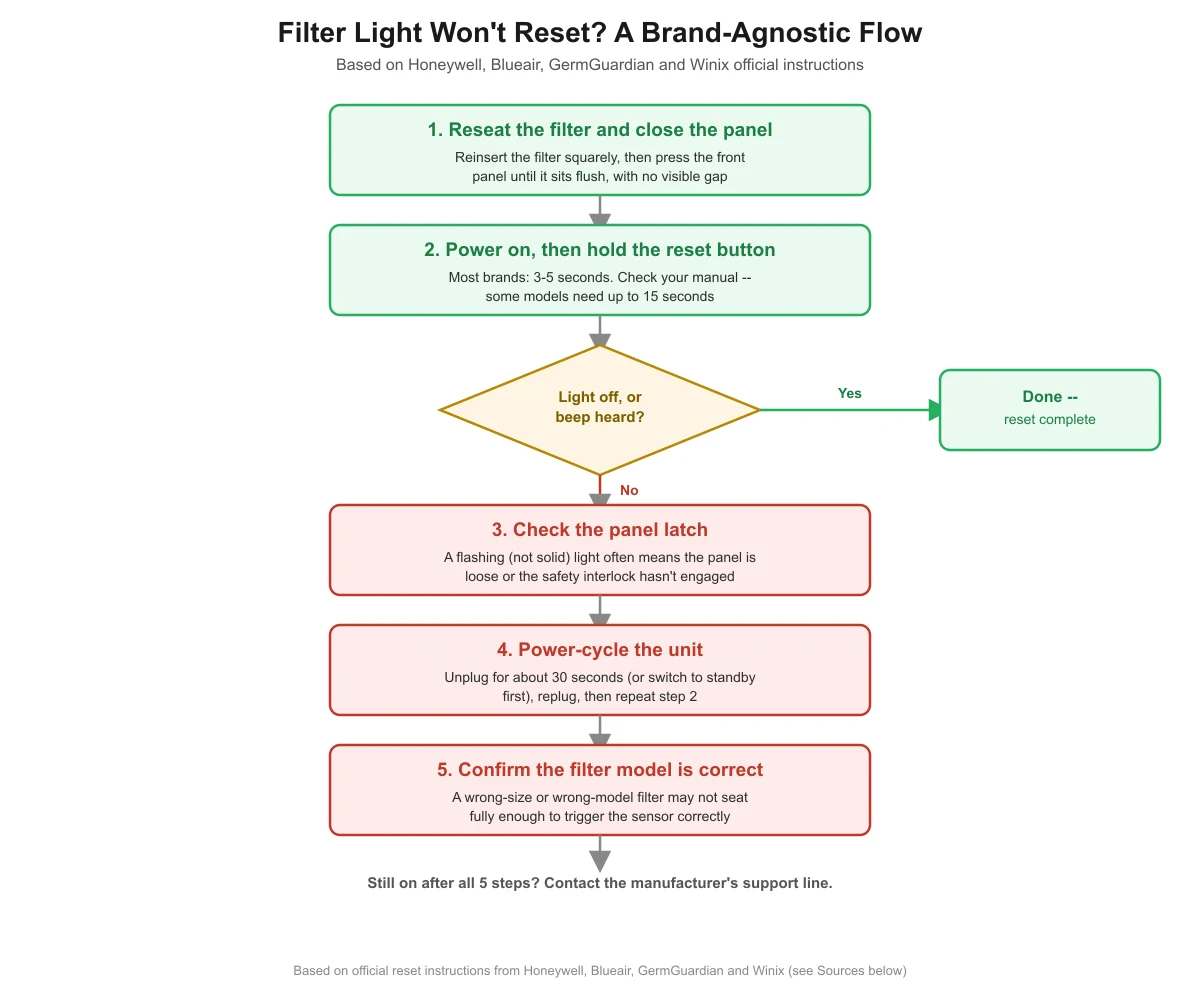
If your air purifier’s filter light stays on after a replacement, work through these in order: reseat the filter and fully close the front panel, power on and hold the reset button (3-5 seconds on most brands, longer on some), check the panel latch if it still flashes, then power-cycle the unit.
- A filter light is a manual reminder counter, not a sensor that reads how dirty the filter actually is — it only clears when you deliberately reset it.
- Most brands’ own instructions call for holding the reset button 3 to 5 seconds, but at least one major brand requires a full 15 seconds, so check your model’s manual before assuming the button is broken.
- A flashing light, as opposed to a steady one, is documented by at least one major manufacturer as a sign the front panel is loose or the safety interlock hasn’t engaged — not a true filter-due signal.
- If the button-hold doesn’t clear it, a full power cycle (unplug, wait, plug back in) resolves it on multiple brands’ own troubleshooting pages.
- This guide covers reset troubleshooting specifically — for the usage-based schedule on when to actually replace each filter stage, see our filter replacement guide.
Why won’t the filter light turn off after I put in a new filter?
Because the light isn’t wired to anything that measures how clean or dirty the filter actually is. It’s a reminder counter — usually based on runtime hours or a simple timer — that a purifier’s internal electronics track, and it only clears when you perform a specific reset action. Installing a new filter doesn’t automatically tell the unit anything changed; you have to tell it.
Most consumer air purifiers also use some version of a safety interlock: a small switch or contact that confirms the front panel is closed and the filter is seated before the unit will run at full power or clear its indicator. That’s a sensible design — it stops someone from running the unit with no filter installed — but it also means a panel that looks closed but isn’t fully latched, or a filter that’s seated slightly crooked, can block a reset from taking even if you press the right button.
What’s the step-by-step fix that works across brands?
The table below is built from the official reset instructions published by four different manufacturers — Honeywell, Blueair, GermGuardian and Winix — so it reflects what their own documentation actually says, not one brand’s manual applied to every unit. Work through it in order; most people only need steps 1 and 2.
| Step | What to do | Why it matters |
|---|---|---|
| 1. Reseat the filter and close the panel | Remove and reinsert the filter squarely, then press the front panel shut until it sits flush with no visible gap | Winix’s own user manual instructs closing the front panel before holding the reset button — the reset function is tied to the panel being fully shut on several brands |
| 2. Power on, then hold the reset button for the full duration | With the unit running (not in standby), press and hold the dedicated filter or reset button. Most tested brands (Honeywell, GermGuardian, Winix) call for 3 to 5 seconds; at least one brand (Blueair’s Blue Pure Max) asks for a full 15 seconds | Manufacturers use a hold-to-confirm design so the light doesn’t clear by accident, and letting go too early is one of the most common reasons a reset appears not to work |
| 3. If it still flashes, check the panel latch | Push the front panel firmly until it clicks or sits flush, then repeat step 2 | A flashing (not solid) light is documented by Honeywell as meaning the panel is loose or ajar, or the safety interlock switch has disengaged |
| 4. Power-cycle the unit | Unplug the unit for about 30 seconds (or switch it to standby first, per Blueair’s instructions), then plug it back in and repeat the reset | Clears a reset function that’s become unresponsive, which multiple brands’ own troubleshooting pages list as a next step |
| 5. Confirm the filter model is correct | Check the model or size number printed on the filter against your unit’s manual | A wrong-size or wrong-model filter can sit slightly off, which may stop it from fully engaging the panel’s safety interlock or triggering the sensor correctly |
Why does the light still flash even after I hold the reset button?
A flashing light and a steady (solid) light usually mean two different things, even though both can look like “the reset didn’t work.” Honeywell’s own support documentation is specific on this point: it describes a flashing red or amber light as a sign that the front intake panel is loose or slightly ajar, that the safety interlock switch has disengaged, or that the filter is misaligned inside the unit — a mechanical problem, not a filter-due reminder. A steady light, by contrast, is the normal filter-due signal that the hold-to-reset steps above are designed to clear.
If your light is flashing rather than steady, the fix isn’t to hold the reset button longer — it’s to open the panel, reseat the filter so it sits flat and square, and press the panel firmly shut until you feel or hear it latch. Only after that should you repeat the button-hold step. No manufacturer in this research published an exact measurement for how much of a gap causes this, so treat “panel feels or looks fully seated” as the practical test rather than looking for a specific number.
Does the hold time really differ that much between brands?
Yes, enough that it’s worth checking before you conclude the button is broken. Honeywell’s standard HPA console series asks users to “press and hold down the illuminated button firmly for 3 to 5 seconds,” and its InSight series asks for 3 seconds on the touch-sensitive Filter Reset icon. Guardian Technologies (GermGuardian) instructs users to “hold down the nightlight/reset button on the top of the unit for 3 seconds” on its pluggable models. Winix’s user manual for its 5500-2 series tells users to hold the Filter Reset Button “for at least 5 seconds until you hear the beep.”
Blueair is the outlier in this research: its Blue Pure Max support page instructs users to “press the Fan button for 15 sec until the red light turns off” — three to five times longer than the other three brands’ stated durations. If you give up after five seconds on a unit that actually needs fifteen, it will look exactly like a failed reset even though nothing is wrong. This is exactly why a single “hold for X seconds” number can’t honestly apply to every brand, and why checking your own unit’s manual matters more than following a generic figure.
Could it be the wrong filter, not a broken button?
It’s worth ruling out before you assume the reset mechanism itself has failed. Most purifiers are designed around one specific filter shape and size, and a filter that’s the wrong model — even a generic or off-brand replacement marketed as “compatible” — can sit slightly crooked or fail to press fully into place. Since several brands tie the reset function to the panel and filter being properly seated, a filter that doesn’t seat correctly can produce the same symptom as a stuck or unresponsive button: the light won’t clear no matter how you press it.
Check the model or part number printed on the filter you removed against the one you installed, and against your unit’s manual if you still have it. If they don’t match, or if the new filter noticeably doesn’t sit as flush as the old one did, that’s a more likely explanation than a hardware fault, and swapping in the correct filter model is the fix — not more attempts at the reset button.

When should I stop troubleshooting and contact support instead?
Stop trying to force a result if the panel won’t latch no matter how you reseat the filter, if you hear cracking or feel resistance that suggests a broken clip or hinge, or if the light still won’t clear after you’ve tried all five steps above with the correct filter installed. At that point, the most likely explanation is a hardware fault — a worn interlock switch, a damaged sensor, or a wiring issue — and that’s a manufacturer support or warranty question, not something to keep working around at home.
Also don’t ignore a light that keeps coming back quickly after a successful reset. If the indicator reappears within days rather than months, that can mean the unit is being run far harder than normal (heavy smoke, pets, or continuous high-speed use) and genuinely needs another filter change soon, rather than a software glitch. Treat a fast-returning light as new information about your filter’s actual lifespan, not as a sign the reset “didn’t take.”
Keep reading: related guides on this site
If you’re not sure the schedule you’re resetting the light to even matches your actual usage, see our guide to how often to replace an air purifier filter by usage level. And for the full spec checklist to use when you’re choosing a unit in the first place — including filter type, certifications, noise and running cost — see our air purifier buying guide.
Frequently asked questions
How long do I need to hold the filter reset button?
It depends on the brand. Honeywell, GermGuardian and Winix’s own instructions call for 3 to 5 seconds, while Blueair’s Blue Pure Max asks for a full 15 seconds. Check your model’s manual for its exact duration before assuming the button isn’t working — letting go too early is one of the most common reasons a reset appears to fail.
Why is my filter light flashing instead of staying solid?
A flashing light usually signals a different problem than a steady one. Honeywell’s support documentation specifically ties a flashing red or amber light to a loose or slightly ajar front panel, a disengaged safety interlock switch, or a misaligned filter — not a normal filter-due reminder. Reseat the filter and firmly close the panel before trying the reset button again.
Will unplugging the unit reset the filter light on its own?
Not by itself in most cases, but a power cycle (unplugging for roughly 30 seconds, or switching to standby first on some brands, then plugging back in) is a documented step on more than one manufacturer’s own troubleshooting page when the button-hold alone doesn’t clear the light. Repeat the normal reset procedure after powering back on.
Could a new filter be the reason the light won’t clear?
Yes, if it’s the wrong model or size for your unit. A filter that doesn’t seat fully flush can prevent the panel’s safety interlock from engaging the way it would with the correct filter, which produces the same symptom as a stuck reset button. Check the model number on the filter against your unit’s manual before assuming the hardware has failed.
Is it safe to keep running the purifier while the light is on?
A filter-due light by itself is a maintenance reminder, not a safety alarm, so running the unit briefly while you troubleshoot the reset isn’t inherently dangerous. That said, don’t ignore it indefinitely — a filter well past its due point filters less effectively, and if the light is flashing because a panel isn’t fully latched, get that latched properly rather than operating the unit with a loose panel.
Sources
- Honeywell Store, How to Reset the Filter Light on a Honeywell Air Purifier — read November 2026
- Blueair, The Red Filter Light Indicator Does Not Reset After Replacing the Filter (Blue Pure Max) — read November 2026
- Guardian Technologies (GermGuardian), How Do You Reset the Filter Indicator or UV-C Indicator Lights? — read November 2026
- Winix America, 5500-2 Series User Manual — read November 2026
airpurifierspace.com Editorial Team. Last updated: November 12, 2026.